The Tuya 5.8GHz Zigbee presence sensor (RM 40–80 on Shopee) is the best budget mmWave sensor for Home Assistant automations. The 24GHz Wi-Fi version, despite being cheaper and easier to find, has a data passthrough problem that makes it unreliable for presence-based automations — avoid it.
I’ve been running two sensor variants in my home for over a year: the 24GHz Wi-Fi version in the living room and the 5.8GHz Zigbee version in the bedroom. The difference in day-to-day reliability is significant enough that I’ve since replaced the 24GHz units.
Which Tuya Presence Sensor Should You Buy?
There are four variants on the market. Based on direct testing:
| Variant | Data in Home Assistant | Reliability | Verdict |
|---|---|---|---|
| 24GHz Wi-Fi | Reports “motion” (not presence) | Degraded after Q4 2024 firmware | Avoid |
| 24GHz Zigbee | Reports “motion” | Untested by me | Uncertain |
| 5.8GHz Wi-Fi | Reports “presence” (assumed) | Untested by me | Uncertain |
| 5.8GHz Zigbee | Reports “presence” correctly | Stable, accurate | Recommended |
The critical difference: “motion” vs “presence” in the entity data. Motion detection triggers once on movement and resets. Presence detection stays active as long as someone is in the room — including when they’re sitting still at a desk or sleeping. For automating lights and aircon, you need presence, not motion.
Why Does the 24GHz Wi-Fi Version Fail?
Two problems emerged after the Q4 2024 Tuya firmware update:
- Wrong entity type: The sensor passes
binary_sensor.motioninstead ofbinary_sensor.presenceto Home Assistant via the Tuya Cloud integration. You can’t build reliable absence-based automations with a motion sensor. - Phantom detections: After the firmware update, several 24GHz units started reporting motion randomly when nothing was in the room. This is likely a sensitivity calibration issue in the new firmware.
The 5.8GHz Zigbee version doesn’t have these problems because it uses the Zigbee protocol directly — it bypasses Tuya’s cloud entirely when connected to a local Zigbee hub.
How to Add the 5.8GHz Zigbee Sensor to Home Assistant
Prerequisites
- A Tuya Zigbee hub paired to your Zigbee2MQTT or ZHA setup, or a Tuya hub connected via the Tuya Cloud integration
- Home Assistant with the Tuya integration configured
Entities You’ll Get
When the sensor pairs correctly, you’ll see:
binary_sensor.presence— the main entity (Home/Away)- No configuration options exposed in HA — set sensitivity and detection range in the Smart Life mobile app first
Set detection range and sensitivity in the Smart Life app before adding to HA, since these settings are easier to adjust there and persist after pairing.
Setting Up the Automation: Lights and Aircon On/Off
5.8GHz Zigbee Automation Rules
ON trigger (faster response is fine — you want immediate action when someone enters):
Trigger: binary_sensor.presence → state changes to "Home"
For: 2 seconds (avoids false triggers from walking past)
Action: Turn on [light/aircon entity]
OFF trigger (longer delay prevents annoying flicker):
Trigger: binary_sensor.presence → state changes to "Away"
For: 10 minutes
Action: Turn off [light/aircon entity]
Important: 10 minutes is the minimum sensible absence delay. If you set it to 2–3 minutes, the lights will turn off when you step out to grab a drink and turn back on when you return — annoying after the first week.
Night-Time Exception
For living rooms and bedrooms, you don’t want the OFF trigger to fire while you’re sleeping. Add a condition:
Condition: Time is between 22:00 and 07:00
→ Skip the OFF action
Or use a boolean helper (input_boolean.night_mode) toggled by a bedtime routine, so the exception activates when you say goodnight to Google Home, not just on a fixed schedule.
Monitoring Your Sensors
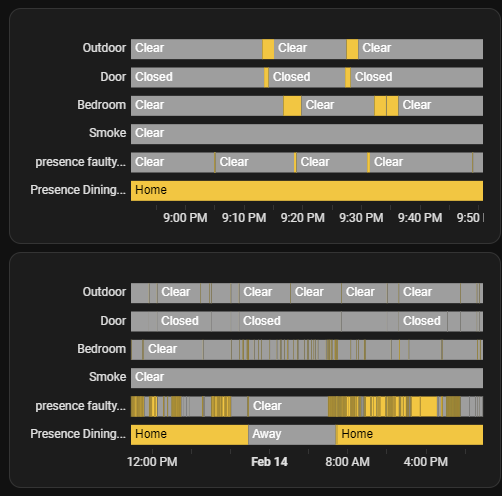
Home Assistant’s History Graph card is the fastest way to verify sensor behaviour:
- Edit dashboard → Add Card → History Graph
- Add all presence and motion sensors
- Set “Hours to show” to 24–48 hours
- Check for phantom detections (presence events with no one home) and missed detections (gaps when you know someone was in the room)
This is worth doing for the first week after setup — you’ll catch calibration issues before they get baked into automations.

Frequently Asked Questions
Which Tuya presence sensor works best with Home Assistant? The 5.8GHz Zigbee version. It reports “presence detected” correctly and has been stable through firmware updates. The 24GHz Wi-Fi version only reports “motion” (not presence) and became unreliable after Q4 2024 firmware changes.
What’s the difference between presence detection and motion detection? Motion detection triggers on movement only — it misses stationary people. mmWave presence detection (24GHz or 5.8GHz radar) detects breathing and micro-movements, so the sensor stays active when someone is sitting still. Essential for automating lights that shouldn’t turn off while you’re at your desk.
How long should I set the absence delay? 10 minutes is a safe starting point. Under 3 minutes causes flickering when you step out briefly. For bedrooms, 5 minutes works. Always add a night-time exception so automations don’t trigger during sleep.
Does the Tuya sensor work without internet? The 5.8GHz Zigbee version can work locally via Zigbee2MQTT or ZHA — no Tuya cloud needed. The Wi-Fi version requires cloud polling and fails when Tuya’s servers have issues.
Also on this blog:
- TTLock Smart Deadbolt Review — smart lock that pairs well with presence-based automations
- Tuya Power Meter Overload Alarm — another real-world Tuya device experience with unexpected behaviour
- Why Smart Homes Have Stalled — the broader picture of what actually works in a smart home
- Mastering the 2026 Home Assistant Shift — move beyond Tuya cloud to full local control
For more practical smart home guides tested in a real Malaysian setup, see the Smart Home section.