2025-03-27_Unlocking-the-Hidden-Power-of-Old-Samsung-Phones–The-Magic-of-the-ROUTINE-App-e920ba9447eb
The Unsung Hero of Smart Automation
Unlocking the Hidden Power of Old Samsung Phones: The Magic of the ROUTINE App
The Unsung Hero of Smart Automation
In the ever-evolving world of smartphones, old devices often end up collecting dust in drawers or getting sold for a fraction of their original price. However, if you own an old Samsung phone, you might be sitting on an automation powerhouse without realizing it. Thanks to Samsung’s ROUTINE app (part of Modes and Routines in One UI), even an outdated device can serve as a crucial tool for automating everyday tasks — especially when faced with internet and power outages.
Whether you’re dealing with an unexpected internet outage or a full-fledged power cut, your old Samsung phone running the ROUTINE app can step in and make life easier. Let’s explore why this app is a game-changer and how you can make the most of it.
What Makes Samsung’s ROUTINE App So Powerful?
ROUTINE is a built-in automation tool available on Samsung devices that allows users to create “if-this-then-that” (IFTTT) style automations without requiring third-party apps. Some of its standout features include:
- Automating Actions Based on Conditions — Set triggers like time, location, WiFi status, battery level, or device connectivity to activate specific actions.
- Offline Functionality — Unlike cloud-based automation tools, ROUTINE works locally on your device, making it ideal for scenarios without internet.
- Custom Triggers & Actions — Examples include automatically enabling power-saving mode at night, switching on Bluetooth when driving, or launching specific apps at designated times.
- Smart Home Controls — Even without internet, it can automate Bluetooth-based smart home devices, like speakers and LED strips.
- Battery & Performance Optimization — Old phones can still work efficiently thanks to automation that disables unnecessary background apps and services.
How to Leverage an Old Samsung Phone with ROUTINE During an Internet Outage = Seamless WiFi Replacement
When your home internet goes down, many smart devices (like Google Home, Alexa, or WiFi-controlled lights) become useless. However, an old Samsung phone running ROUTINE can serve as a seamless replacement for WiFi and an automation hub:
In Samsung App:
- Set hotspot login information the same as your home WiFi SSID name and password. Set NEVER timeout.
- In the ROUTINE app, set:
- Rule 1: When disconnected from home WiFi, turn on the hotspot.
- Rule 2: When connected to home WiFi, turn off the hotspot.
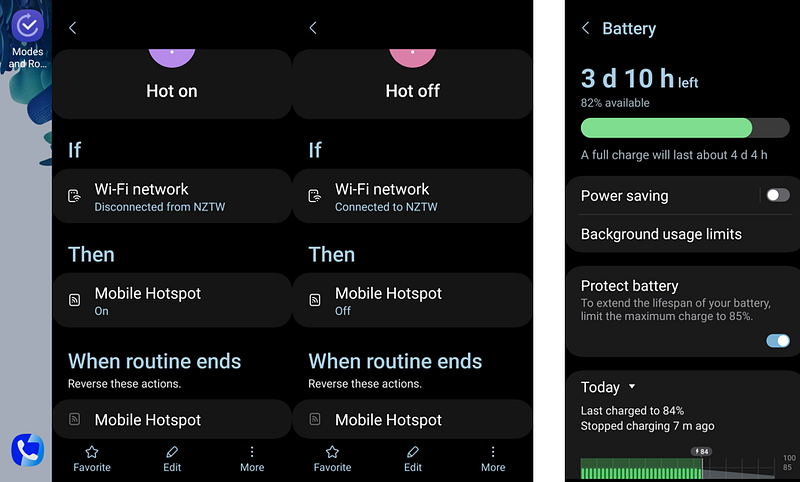
- In battery settings, enable Protect Battery to prevent long-term damage.
- Keep the phone always charging and ensure it has a basic data plan or SIM installed.
In Router (e.g., ASUS Merlin Custom Script):
Use a script to disable WiFi when the WAN is down and enable it when WAN is up again:
#!/bin/sh
while true; do
  if ! ping -c 1 8.8.8.8 >/dev/null 2>&1; then
    logger "WAN is down, turning off WiFi"
    nvram set wl0_radio=0  # Disable 2.4GHz
    nvram set wl1_radio=0  # Disable 5GHz
    nvram commit
    service restart_wireless
  else
    logger "WAN is up, keeping WiFi on"
    nvram set wl0_radio=1
    nvram set wl1_radio=1
    nvram commit
    service restart_wireless
  fi
  sleep 60  # Check every 60 seconds
done
How to Use an Old Samsung Phone When Both Power and Internet Are Down — Re-power after a Lightning Strike
When both power and the internet are down (e.g., due to a lightning strike), your old Samsung phone can still act as an essential automation hub.
In Samsung App:
- Set hotspot login information the same as your home WiFi SSID name and password.
- In the ROUTINE app, set:
- Rule 1: When disconnected from home WiFi, turn on the hotspot. Set NEVER timeout.
- Rule 2: When connected to home WiFi, turn off the hotspot.
- In battery settings, enable Protect Battery to prevent long-term damage.
- Keep the phone always charging and ensure it has a basic data plan or SIM installed.
Smart Power Meter Control (e.g., Tuya WiFi Smart Meter)
- No extra configuration is needed — simply control power meters via the Tuya app.
- Open the respective app (e.g., Tuya) and manually turn on/off the smart power meter once power is restored.
IMPORTANT:
DO NOT set auto turn on the power again as this might be a protection mechanism, e.g. water heater/ shower circuit break.
Other Interesting Samsung ROUTINE Triggers and Actions that can Enable more complex commands
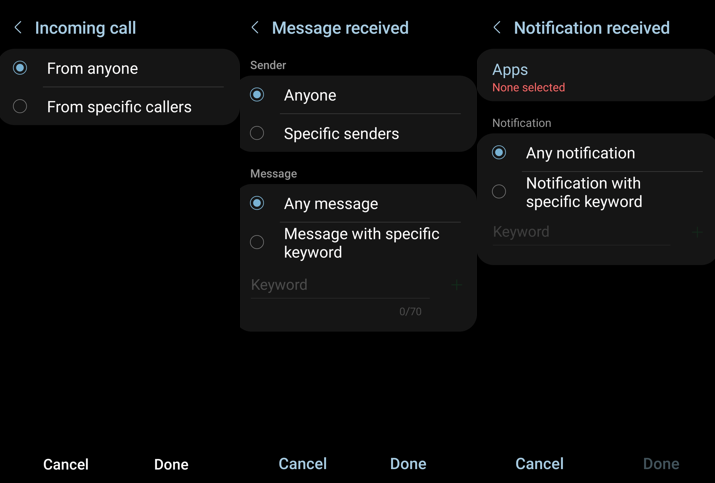
Triggers:
- Message received
- Incoming call
- Notification received
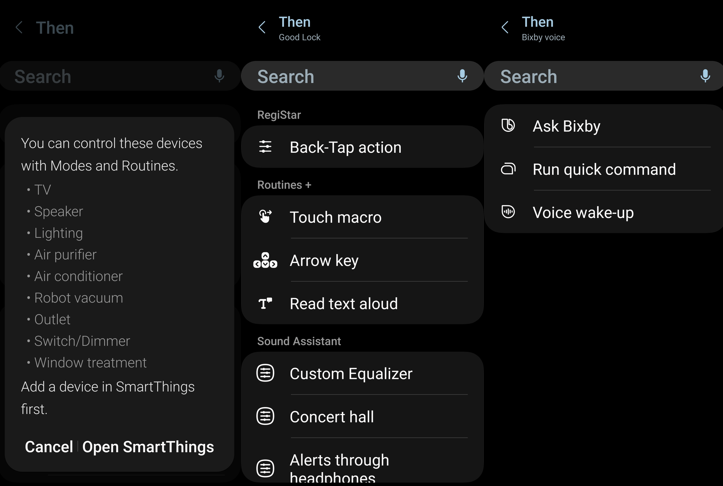
Actions:
- Trigger SmartThings actions (turn on/off smart home devices)
- Trigger Touch Macro, which records more complex actions within an app
- Run a quick Bixby command
Conclusion: Give Your Old Samsung Phone a Second Life
With the ROUTINE app, an old Samsung phone is far from obsolete — it becomes a reliable automation hub, ensuring convenience and security even when modern cloud-reliant devices fail. Whether it’s an internet outage or a complete power cut, this powerful tool can keep essential tasks running smoothly.
So, before tossing that old Samsung phone aside, consider repurposing it with ROUTINE — because a little automation can go a long way, even when everything else is offline.